 |
dev.tirsvad.dk
Tirsvad Website: A Clean Architecture .NET solution using Blazor WebAssembly for modern, cloud-ready web applications. Supports SQLite/MySQL, containerization, and follows best practices for maintainability and scalability.
|
|
dev.tirsvad.dk
Tirsvad Website: A Clean Architecture .NET solution using Blazor WebAssembly for modern, cloud-ready web applications. Supports SQLite/MySQL, containerization, and follows best practices for maintainability and scalability.
|
[![NuGet Downloads][nuget-shield]][nuget-url][![Contributors][contributors-shield]][contributors-url][![Forks][forks-shield]][forks-url][![Stargazers][stars-shield]][stars-url][![Issues][issues-shield]][issues-url][![License][license-shield]][license-url][![LinkedIn][linkedin-shield]][linkedin-url]
 Menu paginator
Pagination Lib for menu selection in C# console applications.


The Menu Paginator library is a C# library that provides a simple and efficient way to create paginated menus in console applications. It allows you to display a list of menu items in a paginated format, making it easy for users to navigate through lists of menu choice.
This section will guide you through the installation and setup of the Menu Paginator library in your C# console application.
You can install this library using NuGet Package Manager or by adding the package reference directly to your project file. The library is available on NuGet, so you can easily install it using the NuGet Package Manager Console or the Visual Studio NuGet Package Manager.
You can install this library using the NuGet Package Manager Console. Open the console and run the following command:
You can also install this library using the Visual Studio NuGet Package Manager. Follow these steps:
You can also install this library using the .NET CLI. Open a terminal and run the following command:
If you want to clone the repository and build the library from source, you can do so using Git. Make sure you have Git installed on your machine. Then, run the following command in your terminal:
In the example you can see how to use the Menu Paginator class.
Contributions are what make the open-source community such an amazing place to learn, inspire, and create. Any contributions you make are greatly appreciated.
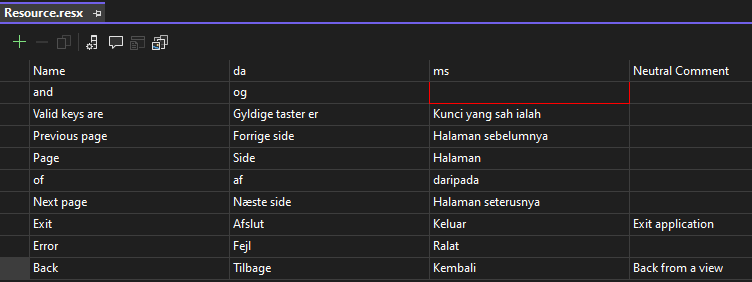
We need help for translate to other languages. If you want to help, please create a new issue with the translation. We will add it to the project.
Resources.resx contains the msg that can be translated. The key text is English.
For now we have the following languages:
If can create a new file called Resources.<language>.resx, where <language> is the language code. For example, for Danish, the file should be called Resources.da.resx. The file should contain the same keys as the original file, but with the translated text.
Distributed under the GPL-3.0 License.
Jens Tirsvad Nielsen - LinkedIn
 1.15.0
