 |
dev.tirsvad.dk
Tirsvad Website: A Clean Architecture .NET solution using Blazor WebAssembly for modern, cloud-ready web applications. Supports SQLite/MySQL, containerization, and follows best practices for maintainability and scalability.
|
|
dev.tirsvad.dk
Tirsvad Website: A Clean Architecture .NET solution using Blazor WebAssembly for modern, cloud-ready web applications. Supports SQLite/MySQL, containerization, and follows best practices for maintainability and scalability.
|
[![NuGet Downloads][nuget-shield]][nuget-url][![Contributors][contributors-shield]][contributors-url][![Forks][forks-shield]][forks-url][![Stargazers][stars-shield]][stars-url][![Issues][issues-shield]][issues-url][![License][license-shield]][license-url][![LinkedIn][linkedin-shield]][linkedin-url]
 Ansi Code
Ansi codes library for console applications.
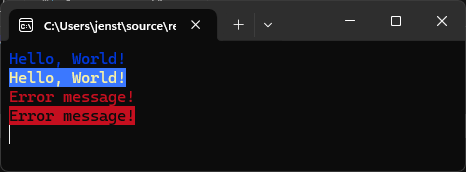
The AnsiCode library is a .NET library that provides a simple and efficient way to work with ANSI escape codes in console applications. It allows developers to easily format text, change colors, and create visually appealing command-line interfaces.
To get started with the AnsiCode library, follow the instructions below to install it in your .NET project.
You can install the AnsiCode library using the NuGet Package Manager Console. Open the console and run the following command:
You can also install the AnsiCode library using the .NET CLI. Open a terminal and run the following command:
If you want to clone the repository and build the library from source, you can do so using Git. Make sure you have Git installed on your machine. Then, run the following command in your terminal:
In the example you can see how to use the AnsiCode class.
Contributions are what make the open-source community such an amazing place to learn, inspire, and create. Any contributions you make are greatly appreciated.
If you encounter a bug or have an issue to report, please follow these steps:
Distributed under the AGPL-3.0 License.
Jens Tirsvad Nielsen - LinkedIn
 1.15.0
